
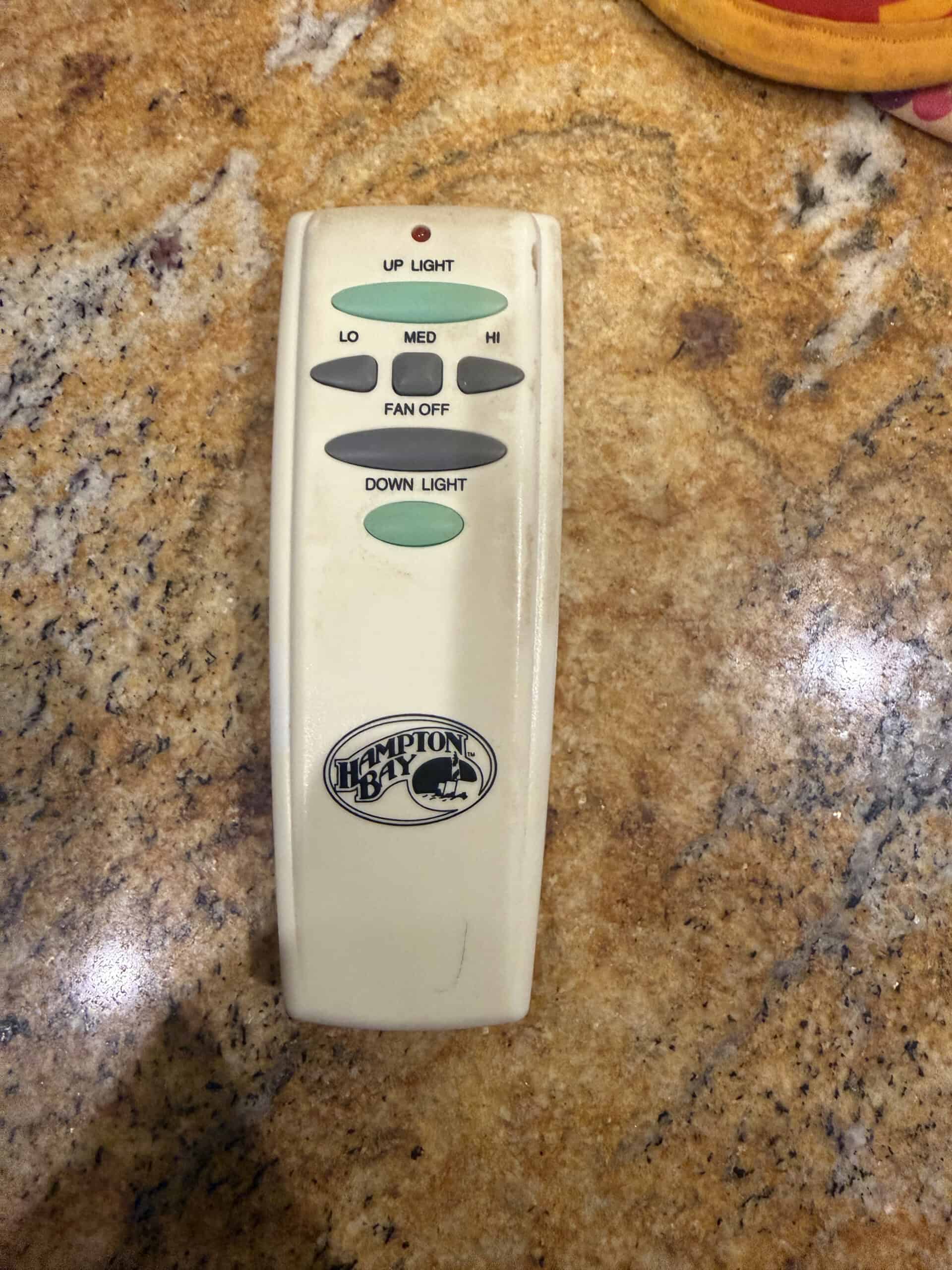
My ceiling fan came with its own remote, and it handles light and speed as separate controls rather than cycling everything through one button. That separation is the thing I would look for if I were buying a replacement, because a remote that makes you step through fan speeds to reach the light is a small irritation you meet every single night.
Most people shopping for one of these are not upgrading. They are replacing something lost, broken, or unreliable, and the question is which remote will actually pair with the fan already on the ceiling. That compatibility question decides everything else. Our roundup of ceiling fans for bedrooms covers the fans themselves.
Why Compatibility Comes First
A ceiling fan remote is only half a system. The other half is a receiver, usually a small module tucked into the fan canopy above the mounting bracket, and the remote has to speak to that specific receiver.
Manufacturer replacements pair with the existing receiver, which makes them the simplest option when they are still available. Universal kits replace the receiver as well, which is why they work with almost any fan and why they involve opening the canopy.
Quick Answer
Look for the manufacturer’s replacement remote first, using the model number on the fan or the old receiver. If that is unavailable, a universal kit with a new receiver works with most fans and requires wiring work at the canopy with the power off at the breaker.
Frequency and dip switch settings matter too. Older systems use physical dip switches inside both the remote and receiver, and those settings have to match. Newer ones pair by holding a button.
1. A Manufacturer Replacement Remote, Best Overall
Why It Stands Out
A replacement from the fan’s maker pairs with the receiver already installed, which means no ladder work, no wiring, and no canopy removal. You match the dip switches or run the pairing sequence and it works.
It also preserves whatever control layout the fan was designed around, including separate light and speed buttons if the original had them.
Worth Knowing
Availability is the problem. Manufacturers stop stocking remotes for discontinued fans, and a fan more than a few years old may have nothing listed.
You need the fan model number, which is usually on a label inside the canopy or on the motor housing rather than anywhere visible from the floor. Our note on whether ceiling fans cool a room covers what the fan is doing.
This suits anyone whose fan is still supported. Skip it if the model is discontinued.
2. A Universal Remote and Receiver Kit, Best When Nothing Matches
Why It Stands Out
Universal kits include a new receiver, so compatibility stops depending on what is already up there. This is the answer when the original remote is gone and no replacement is listed.
Most also add features the original lacked, including timers and reverse control.
Worth Knowing
Fitting one means dropping the canopy and wiring the receiver in, with the power off at the breaker rather than the wall switch. Anyone uncomfortable with that should have an electrician do it.
The receiver also has to physically fit inside the canopy, and low-profile fans have very little room. Check the stated dimensions against your fan.
This suits discontinued fans. Skip it if you would rather not open the canopy.
3. A Wall-Mounted Control, Best for Not Losing It
Why It Stands Out
Wall units mount in a switch box or sit in a holder, which solves the problem that ends most remotes: nobody knows where it is.
A fixed position also means one place to look rather than searching bedding in the dark.
Worth Knowing
Some wall controls are wired and need a switch box with the right conductors, which older wiring may not have. Others are simply a holder for a handheld unit.
Wired versions are also not something to install without turning off the breaker and knowing what you are looking at. Our roundup of smart bulbs covers the switches these sit alongside.
This suits households that lose remotes. Skip it if you want the control by the bed.
4. A Smart Wi-Fi Fan Controller, Best for Automation
Why It Stands Out
Smart controllers add phone and voice control, plus schedules that can run the fan overnight and stop it before morning without anyone reaching for anything.
For a bedroom fan that runs every night, a schedule is genuinely more useful than a remote.
Worth Knowing
These depend on an app and a network, so a router problem becomes a fan problem. Most keep a physical remote as backup for exactly that reason.
Installation is the same canopy work as a universal kit. Our guide to closet and wardrobe lighting covers simpler automation that needs no wiring.
This suits anyone already running smart home devices. Skip it if you want something that works without a network.
5. A Remote With Separate Light and Speed Controls, Best Layout
Why It Stands Out
Remotes that give the light its own button, rather than cycling through fan speeds to reach it, are faster to use in the dark and easier for anyone unfamiliar with the fan.
Separate speed buttons also let you go straight to the setting you want instead of stepping through the others.
Worth Knowing
Layouts vary enormously and product photos do not always make the button functions obvious. Read the description rather than assuming from the picture.
Backlit buttons help in a dark bedroom and are less common than they should be. Our note on night lights covers seeing what you are doing at 3am.
This suits bedroom use specifically. Skip it if the fan is in a room you use in daylight.
6. A Multi-Fan Remote, Best for Several Fans
Why It Stands Out
Remotes that address multiple receivers on different channels let one handset run fans in several rooms, or let two remotes work one fan without interfering.
Channel separation also stops a neighbor’s remote operating your fan, which does happen with default settings.
Worth Knowing
Every receiver has to be set to its own channel, which means opening every canopy. That is the work you are signing up for.
Mixing brands across fans usually defeats a multi-fan remote, so this suits matched installations.
This suits homes with several fans. Skip it for a single bedroom fan.
Fan Remotes at a Glance
| Type | Needs wiring | Works with | Best for |
|---|---|---|---|
| Manufacturer replacement | No | That fan only | Supported models |
| Universal kit | Yes, canopy | Most fans | Discontinued fans |
| Wall control | Sometimes | Varies | Lost remotes |
| Smart Wi-Fi | Yes, canopy | Most fans | Schedules and voice |
| Separate light and speed | Depends on type | Varies | Bedroom use |
| Multi-fan | Yes, each canopy | Matched fans | Several rooms |
The Remote I Use
Mine is the original that came with the fan, and it has separate controls for the light and the fan speed rather than one button cycling through everything. That layout is the part worth pointing out, because it is not universal and it is genuinely better in a dark bedroom.
Reaching for a remote and knowing which button does what without looking is the whole value of the thing. A cycling layout makes you count presses, which is fine in daylight and irritating at night.
Worth being clear about the limits of that. I have not replaced this remote, fitted a universal kit, or wired a receiver, so the installation notes above come from product documentation rather than from work I have done. What I can speak to is which layout is nicer to live with.
What to Look For in a Fan Remote
Will it pair with your receiver?
This is the whole question with a replacement remote. Find the fan model number, usually on a label inside the canopy, and check what the manufacturer lists before buying anything generic.
Are light and speed separate?
A dedicated light button beats cycling through fan speeds to reach it, particularly in a bedroom. Check the button functions rather than the button count.
Does it need a new receiver?
Universal kits do, which means canopy work with the breaker off. Manufacturer replacements do not. That difference is the main reason to try the manufacturer route first.
Can you find it in the dark?
Backlit buttons, a distinctive shape, or a wall holder all help. A remote you cannot locate at night is one you stop using.
Replacement or Universal?
Start with the manufacturer
No wiring, no ladder, no canopy. If the fan is still supported and a remote is listed, this is a five-minute fix rather than a job.
When universal makes sense
Discontinued fans, lost receivers, and situations where the original system has failed rather than just the handset. It works with almost anything and it means opening the fan. Our comparison of ceiling fans and floor fans covers whether the fan is the right one for the room.
What Trips People Up
Buying a remote without checking the receiver
A handset alone will not work unless it pairs with what is already installed. Model number first, purchase second.
Forgetting the dip switches
Older systems need matching switch settings in both remote and receiver. A remote that seems dead is often just set to a different code.
Working with the wall switch off
The wall switch does not make the canopy safe. Anything involving the receiver needs the breaker off, and anyone unsure of that should call an electrician.
Assuming universal means no work
Universal refers to compatibility, not installation. It still means a new receiver in the canopy. Our roundup of quiet fans for sleeping covers alternatives that need no wiring at all.
Related Reading
See our note on why people sleep better with a fan, our comparison of white noise machines and fans, our bedside fan picks, and a note on running a fan and AC together.
Ceiling Fan Remote FAQ
Will any remote work with my ceiling fan?
No. The remote has to pair with the receiver already installed in the fan canopy, which is usually specific to the manufacturer. A universal kit works with most fans because it includes a new receiver, which means wiring work rather than just a new handset.
How do I find my fan model number?
Usually on a label inside the canopy or on the motor housing, which means getting up to the fan. It is worth doing before ordering anything, since it determines whether a manufacturer replacement exists.
My remote stopped working. Is it broken?
Check batteries first, then the dip switch settings if the system uses them, since a knocked switch makes a working remote appear dead. Receivers also fail, so a new handset does not always fix it.
Do I need an electrician for a universal kit?
Fitting one means dropping the canopy and wiring a receiver with the power off at the breaker. Anyone comfortable doing that safely can manage it, and anyone unsure should get an electrician rather than working it out on a ladder.
Can a neighbor’s remote control my fan?
It can happen with systems left on default dip switch settings, since the codes are not unique. Changing the switch positions in both remote and receiver to a different combination stops it.
Is a smart controller better than a remote?
For scheduling and voice control, yes, and it depends on an app and a network staying up. Most people keep a physical remote alongside for when the network is down. Installation is the same canopy work as a universal kit.
Recommended Reading
See our note on cooling a bedroom for better sleep.
