
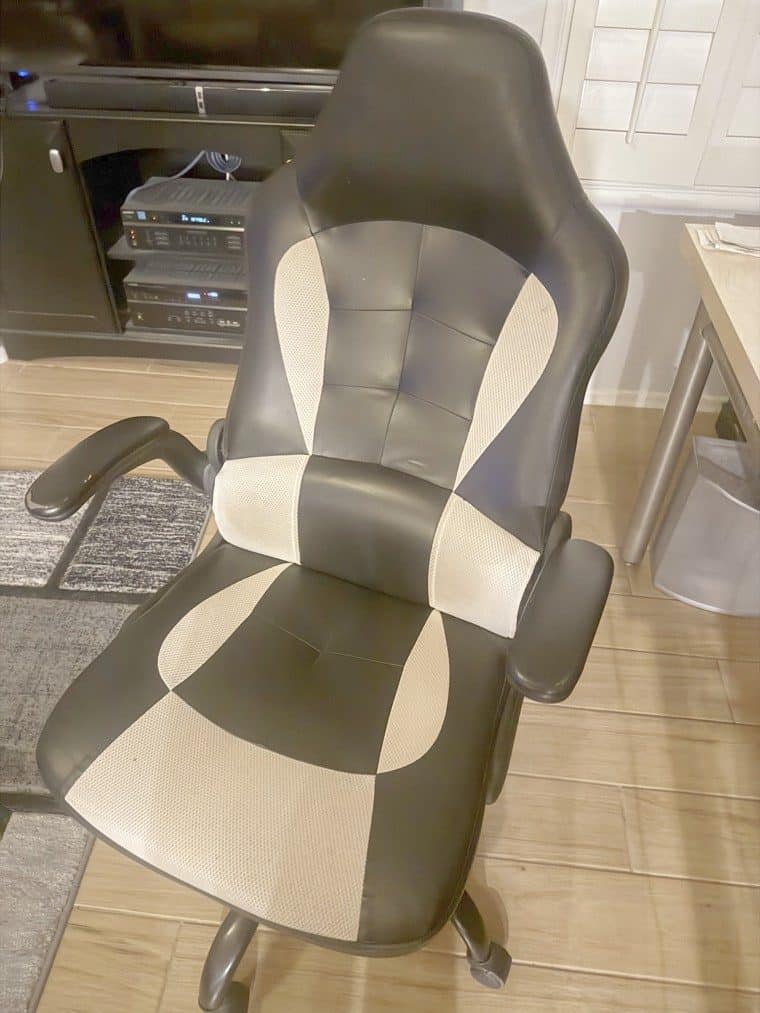
The best office chairs for back pain combine adjustable lumbar support, a seat height and depth you can tune to your body, and enough recline and armrest adjustment to keep your spine in a neutral, supported position through a long workday. If you sit at a desk for hours, the right chair can make a real difference to how your back and neck feel by the afternoon, which is why it belongs at the center of any work-from-home back-pain setup. A chair supports good posture, but it works best alongside movement and breaks, not as a substitute for them. Here is how to choose one, from someone who sits a lot.
Quick Verdict
Look for adjustable lumbar support, seat height and depth adjustment, and armrests you can position so your shoulders relax. A separate lumbar bolster pillow is a genuine help for the lower back on long days. No chair treats back pain on its own, so pair a supportive chair with regular movement and see a professional for persistent or severe pain.
Why Trust This Guide
Independent picks, reader-supported through affiliate links at no cost to you. I work at a desk for long stretches and use an office chair that helps my posture and back, and it came with a separate lumbar bolster pillow for my lower back that I have found genuinely useful. My experience is with my own chair; the other picks are research-based, chosen for real support and value, not medical claims.
Key Takeaways
- rolling after a day at the desk
- Adjustable lumbar support is the single most important feature for back pain.
- Seat height and depth should fit your body, not the other way around.
- A lumbar bolster pillow adds targeted lower-back support on long days.
- A chair supports posture but does not replace movement and breaks.
- See a professional for persistent, severe, or worsening back pain.
Medical Disclaimer
This is general information about bedding and consumer products, not medical advice. Bedding can affect comfort and it does not treat pain conditions, and persistent pain warrants assessment by a doctor or physical therapist rather than a purchase.
A chair can only be set correctly against a desk of a workable height. The calculator below returns seat height, desk height and monitor height from your own height, seated or standing. Enter the desk you already have and it says how far off it sits and which way to correct.
How We Picked These Office Chairs
We prioritized adjustability, since a chair that fits your body supports your spine far better than a fixed one, then weighed lumbar support, seat comfort over long hours, build quality, and weight capacity. The goal is a chair that helps you hold a neutral, supported posture without constant fidgeting. The honest point many listings skip: even the best chair is only part of the picture. Good support reduces strain, but getting up regularly, adjusting the chair to you, and moving through the day matter just as much, and no chair is a treatment for a medical problem. Picks below are grouped by the support style that suits different needs. Seating occupied all day by someone who cannot shift position needs more, covered in our wheelchair cushion guide.
Ergonomic Chair With Adjustable Lumbar Support
Why It Stands Out
An ergonomic chair with adjustable lumbar support is the core recommendation for back pain, because it lets you position the support to match the curve of your lower spine. That adjustability is what separates a genuinely supportive chair from one that just looks the part. For recovery rather than sitting posture, a shiatsu massage chair works on the muscles a good office chair only supports.
Worth Knowing
Adjustable lumbar comes in different forms, from height-adjustable pads to depth-adjustable mechanisms, and the more tuning it offers, the better the fit. These chairs cost more than a basic task chair, but the adjustability is where the value is. Set the lumbar support so it fills the small of your back without pushing you forward.
This is for the desk worker who sits for hours and wants support tailored to their own spine, especially anyone with existing lower-back discomfort. Someone putting in full days at a computer benefits most from getting the lumbar position right. Skip a fully adjustable ergonomic chair only if your budget is very tight, in which case a simpler chair plus a separate lumbar pillow is a reasonable fallback.
High-Back Chair With Adjustable Headrest
Why It Stands Out
A high-back chair with an adjustable headrest extends support up to the neck and head, which matters if your discomfort is not just in the lower back. The headrest gives you somewhere to rest your head when you lean back, taking load off the neck and shoulders.
Worth Knowing
A high back is taller and takes more space, and the headrest only helps if it adjusts to your height. Recline that locks at different angles lets you shift position through the day. These tend to be larger chairs overall.
This suits the person whose neck and shoulders tire along with their back, or who likes to recline periodically to unload the spine. Someone on long calls or reading at the screen for hours will appreciate the neck support. Skip a high-back headrest chair if you have limited space under a desk or prefer a lower-profile chair that tucks away.
Mesh-Back Ergonomic Chair
Why It Stands Out
A mesh-back chair combines ergonomic support with breathability, so your back stays cooler over a long, warm day. The flexible mesh conforms to your back while still providing structure, and many mesh chairs include adjustable lumbar as well.
Worth Knowing
Mesh quality varies, and a cheap, saggy mesh offers little support, so look for a firm, well-tensioned back. Mesh is less plush than padded upholstery, which some people prefer and others do not. It is a strong pick in hot climates where a padded chair feels warm.
This is for the person who runs warm, works in a hot room, or simply wants breathable support that still adjusts. Someone in a warm climate doing all-day desk work gets real comfort from the airflow. Skip mesh if you want a soft, cushioned feel or if you have found firm backs uncomfortable in the past.
Chair Paired With a Lumbar Bolster Pillow
Why It Stands Out
A chair that includes, or is paired with, a separate lumbar bolster pillow gives targeted lower-back support you can position exactly where you need it. The bolster fills the gap between your lower back and the seat back, which is often where support is missing.
Worth Knowing
A bolster pillow is also the cheapest way to add lumbar support to a chair that lacks it, so it is a flexible upgrade as well as a feature. The chair I use came with a separate lumbar bolster pillow for the lower back, and for long days at the desk I have found that focused lower-back support makes a real difference to how I feel by evening. Position it so it supports the curve of your lower spine, not higher up.
This is for the person who wants adjustable lower-back support without buying a premium mechanism, or who already has a chair that just needs more lumbar help. Someone whose main complaint is the lower back specifically benefits most. Skip a bolster only if your chair’s built-in lumbar already fits you well, since doubling up can push you too far forward.
Executive Padded High-Back Chair
Why It Stands Out
An executive-style padded high-back chair offers cushioned comfort and a more traditional look, with generous padding through the seat and back. For people who find firm or mesh chairs unforgiving, the extra cushioning can make long sitting more comfortable.
Worth Knowing
Padding is not the same as support, so check that the chair still offers real lumbar structure rather than just soft foam. Heavily padded chairs can run warm and, over time, foam compresses. Look for one that pairs cushioning with adjustability.
This suits the person who prioritizes a soft, cushioned feel and a more formal appearance for a home office. Someone who finds firmer chairs uncomfortable often prefers this style. Skip a heavily padded executive chair if you want firm, structured support or breathability, where an ergonomic or mesh chair serves your back better.
Kneeling or Active-Sitting Chair
Why It Stands Out
A kneeling chair or active-sitting stool takes a different approach, tilting your pelvis forward to encourage a more upright, engaged posture and taking pressure off the lower back. For some people, changing how they sit helps more than adding support to a conventional chair.
Worth Knowing
Active seating takes getting used to and is usually best in rotation with a regular chair rather than all day at first. It offers no back or arm support, which is the point, but that does not suit everyone. Ease into it gradually.
This is for the person who wants to actively vary their posture or who has found that sitting still in any chair bothers their back. Someone looking to break up long static sitting benefits from alternating to it. Skip active seating if you need back support to get through the day or have knee, hip, or balance issues that make it unsuitable.
Office Chairs for Back Pain at a Glance
| Type | Support focus | Best for |
|---|---|---|
| Adjustable ergonomic | Tunable lumbar | All-day desk work |
| High-back with headrest | Back and neck | Neck and shoulder strain |
| Mesh-back ergonomic | Breathable support | Warm rooms, hot climates |
| Chair with lumbar bolster | Targeted lower back | Lower-back focus, upgrades |
| Executive padded | Cushioned comfort | Soft-feel preference |
| Kneeling/active | Posture change | Varying static sitting |
How to Choose an Office Chair for Back Pain
Start with adjustable lumbar support
The most important feature is lumbar support you can position to your own spine. A pad or mechanism you can move up, down, or in and out lets you fill the curve of your lower back, which is where support matters most.
Fit the seat to your body
Seat height should let your feet rest flat with knees near level with hips, and seat depth should leave a small gap behind your knees. A chair that adjusts to you supports better posture than one you have to adapt to. Our desk height calculator returns both numbers from your own height.
Set the armrests to unload your shoulders
Adjustable armrests let your shoulders relax and your forearms rest without hunching. Armrests set at the right height take strain off the neck and upper back over a long day.
Match the material to your climate and feel
Mesh breathes and suits warm rooms, while padded upholstery feels softer but warmer. Choose based on how warm you run and whether you prefer firm structure or cushioning, without giving up real lumbar support.
Office Chair vs Standing Desk
When a supportive chair is the answer
A good ergonomic chair supports your spine during the hours you do sit, which is most of the day for many desk workers. It is the foundation of a comfortable setup and the first thing to get right.
When to add standing or movement
Standing periodically and moving through the day relieves the static load that sitting places on the back, no matter how good the chair. The best approach is usually both: a supportive chair plus regular position changes, rather than relying on either alone.
Common Office Chair Mistakes to Avoid
Buying on padding instead of support
A soft, plush chair can still leave your lower back unsupported. Prioritize adjustable lumbar and proper fit over how cushioned a chair looks or feels in the first minute.
Never adjusting the chair
An adjustable chair only helps if you actually set it to your body. Take a few minutes to dial in the lumbar, seat height, depth, and armrests rather than using the default settings.
Expecting a chair to fix back pain by itself
A chair supports posture; it does not treat an underlying problem. Pair it with movement and breaks, and see a professional if pain is persistent, severe, or getting worse, rather than relying on the chair alone.
Sitting still for hours
Even the best chair is not meant for motionless all-day sitting. Get up, stretch, and change position regularly to keep the load off your spine.
Simple Desk Habits That Help Your Back
A supportive chair does more when the rest of your setup works with it. Position your monitor so the top of the screen is near eye level, which keeps you from craning your neck forward, and set your keyboard and mouse so your elbows stay close to your sides with relaxed shoulders. Keep your feet flat, using a footrest if the chair sits high, and avoid crossing your legs for long stretches, which tilts the pelvis. Above all, build in movement: stand, stretch, or walk for a moment every half hour or so. These small habits cost nothing and, together with a chair fitted to you, do more for your back than any single piece of equipment.
Recommended Reading
- lumbar support pillows, to add targeted lower-back support to any chair.
- ergonomic pillows for desk workers, for more desk-comfort options.
- under-desk footrests, which help you fit the chair to your body.
- work-from-home back-pain relief, for the wider setup.
Office Chairs for Back Pain FAQ
What type of office chair is best for back pain?
An ergonomic chair with adjustable lumbar support, seat height, and seat depth is generally best, because it lets you fit the support to your own body. The key is adjustability, so the chair holds your lower back in a neutral, supported position rather than forcing you to adapt to it.
Does a lumbar support pillow really help?
For many people, yes. A lumbar bolster pillow fills the gap between the lower back and the seat back, adding targeted support where chairs often lack it. It is also an inexpensive way to improve a chair that has weak or no built-in lumbar support.
How should I set up my chair for back pain?
Set the seat height so your feet rest flat and knees sit near hip level, adjust the depth to leave a small gap behind your knees, and position the lumbar support in the curve of your lower back. Then set armrests so your shoulders relax. Fitting the chair to you is what makes it work.
Can an office chair fix my back pain?
A supportive chair can reduce strain and help you sit with better posture, but it is not a medical treatment and does not fix an underlying problem on its own. Combine it with movement and breaks, and consult a professional for persistent or severe pain.
Is mesh or padded better for back pain?
Both can work; what matters is real lumbar support and fit. Mesh breathes and suits warm rooms, while padded chairs feel softer but can run warm and compress over time. Choose based on your climate and comfort preference, as long as the chair supports your lower back.
How long should I sit in an office chair at a time?
Even in a good chair, aim to change position and get up regularly rather than sitting motionless for hours. Short, frequent movement breaks relieve the static load on your spine, which no chair can do for you.
Do I need an expensive chair to help my back?
Not necessarily. What matters most is adjustable lumbar support and a fit that suits your body, which some mid-range chairs offer. A simpler chair paired with a lumbar bolster pillow and a well-set-up desk can also work well, so match the spend to the features you actually need.
When should I see a doctor about back pain?
See a professional if your back pain is persistent, severe, worsening, or accompanied by other symptoms. A supportive chair is a helpful tool for comfort and posture, but ongoing or serious pain warrants proper medical assessment rather than self-managing with equipment alone.
More in this guide: our guide: how to relieve pain better sleep, inversion tables for back pain, our mattresses for stomach sleepers with back pain guide.
Alternating sitting and standing needs both setups. anti-fatigue mats covers the standing half.
Height affects fit more than most specifications. chairs for tall people covers seat depth and back height.
Sources
- American Academy of Orthopaedic Surgeons. OrthoInfo patient resources. https://orthoinfo.aaos.org/
- National Institutes of Health. MedlinePlus health topics. https://medlineplus.gov/
