
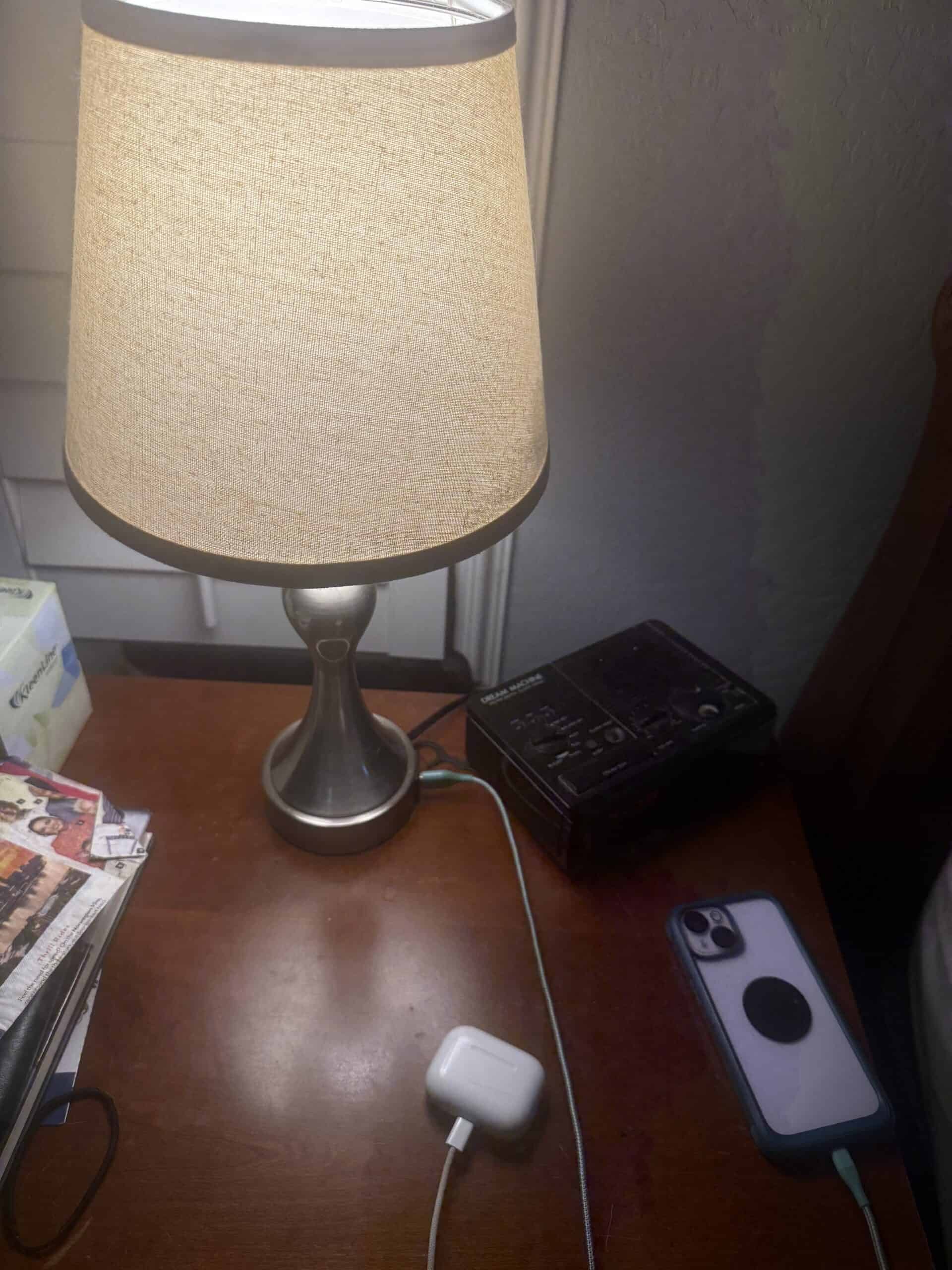
A nightstand charging setup is solved by two things: enough ports for everything that charges overnight, and cables long enough to reach the surface without pulling tight. Most bedside frustration comes from one of those being wrong rather than from the charger itself being slow.
The usual bedroom problem is that the outlet is behind the bed or across the room, and the nightstand is neither. That gap is what the products below solve in different ways, some by bringing power to the nightstand and some by putting the ports in something already sitting on it.
Quick Verdict
A lamp with built-in USB ports is the tidiest answer if you already have a lamp on the nightstand, since it removes a device without adding one. Add an extension with extra outlets when you charge more than a phone. Match cable length to the actual distance rather than buying the shortest one that technically reaches.
Key Takeaways
- Built-in lamp USB ports remove a separate charger from the surface
- Count everything that charges overnight, not just the phone
- Cable length should exceed the distance so nothing pulls tight
- A 3-foot cable suits a charger already on the nightstand
- A 6-foot cable is what reaches a wall outlet from the bed
- Charging lights are worth checking, since they sit at eye level in a dark room
How We Picked
Port count came first, because it is the specification people underestimate. A phone, earbuds, a watch, and occasionally a tablet all want charging overnight, and a single-port charger sends the rest somewhere else in the room.
Placement flexibility was second. The best charger in the world is useless if it cannot sit where you want it. Products that either integrate into something already on the nightstand, or bring outlets to it, ranked above those assuming an outlet is conveniently placed.
Light output finished the list. Anything on a nightstand is at eye level when you are lying down, and a bright LED on a charger undoes work you may have done elsewhere on blocking light. Units with dim or no indicator ranked higher.
What I Actually Use
My own setup runs off a lamp with a USB port built into it. That single detail does most of the work, because the lamp was going to be on the nightstand anyway and the port means the phone charges without a separate brick taking up space or needing its own outlet.
The phone runs on a standard 3-foot iPhone cable, which is the right length when the port is already on the nightstand. Anything longer would just be slack coiled on the surface.
Alongside that I run an extension cord with a second cable on it for AirPods, using a 6-foot cable. Two devices, two cables, two different lengths for two different distances. That is the whole arrangement and it works, which is the point worth making: a bedside setup does not need to be clever, it needs to have a port for each thing and a cable that reaches. Keeping those cords contained is its own problem, and clips and sleeves stop them disappearing behind the table.
My experience covers one lamp-integrated USB setup with two cables in an apartment bedroom. It does not cover wireless charging pads, charging docks, or multi-device stands, which I have not used.
1. The Lamp With Built-In USB Ports
Why It Stands Out
A lamp is already on most nightstands, so putting the ports in it means one object doing two jobs. The wall outlet stays free, the surface stays clear, and the cable runs a short distance from the lamp base rather than across the room.
Worth Knowing
Port speed varies enormously in these, and some older designs charge slowly enough to matter overnight for a nearly-flat phone. Check the output rating rather than assuming, and confirm whether the ports work with the lamp switched off, since some are wired through the switch.
Right for anyone with a nightstand lamp and a phone to charge. Skip it if you need fast charging for several devices at once.
2. The Nightstand Power Strip
Why It Stands Out
A compact strip with outlets and USB ports brings the whole power situation to the nightstand in one piece. For anyone charging more than two things, or running a lamp and a clock alongside, this handles it without a tangle of adapters at the wall.
Worth Knowing
Strips have indicator lights, often bright ones, and they sit at eye level. Look for models with a dim or switchable LED. Placement matters too, since a strip on the floor collects dust and one on the nightstand takes surface space.
Right for multi-device charging and cluttered bedside setups. Skip it if two USB ports covers everything you own.
3. The Multi-Port Wall Charger
Why It Stands Out
A single block with three or four ports replaces a handful of separate adapters and frees the second outlet. Modern units deliver fast charging to a phone while trickling to earbuds and a watch off the same brick.
Worth Knowing
Total output is shared across ports, so four devices charging at once each get less than the headline figure. That is usually fine overnight and matters if you are topping up quickly before leaving.
Right for consolidating several chargers into one. Skip it if the outlet is too far from the nightstand to be useful.
4. The Long Extension Cable
Why It Stands Out
Sometimes the fix is not a better charger but a cable that actually reaches. A 6-foot or 10-foot cable turns an outlet behind the bed into a usable bedside charging point with no new hardware at all.
Worth Knowing
Cheap long cables charge slowly because of voltage drop over distance, so a certified cable matters more at 10 feet than at 3. A cable running across a floor is also a trip hazard and worth routing behind furniture.
Right for outlets in awkward positions. Skip a longer cable than you need, since the excess just coils on the nightstand.
5. The Wireless Charging Pad
Why It Stands Out
Setting a phone down rather than plugging it in is genuinely easier half asleep, and there is no connector to fumble in the dark. A pad also keeps the phone in one predictable place on the nightstand.
Worth Knowing
Wireless charging is slower and generates more heat than a cable, and alignment matters, so a phone knocked slightly off center overnight may not charge at all. Thick cases can interfere. Many pads also have an indicator light that stays on.
Right for convenience and a tidy surface. Skip it if you need a reliably full battery every morning.
6. The Multi-Device Charging Stand
Why It Stands Out
A stand holding a phone, earbuds, and a watch in dedicated positions turns a nightstand into an organized dock. Everything has a place, nothing slides around, and one cable goes to the wall.
Worth Knowing
These are sized around specific device combinations, so a stand built for a phone and a watch is wasted space if you do not own a watch. They also take up considerably more surface area than a couple of cables do, which matters on a small nightstand.
Right for households with several devices charging bedside. Skip it if you charge a phone and one other thing.
Bedside Charging Options at a Glance
| Option | Devices | Surface space used | Best for |
|---|---|---|---|
| Lamp with USB | 1 to 2 | None extra | Existing lamp on the nightstand |
| Nightstand power strip | Several | Small | Multi-device setups |
| Multi-port wall charger | 3 to 4 | None on surface | Consolidating adapters |
| Long cable | 1 | Minimal | Distant outlets |
| Wireless pad | 1 | Moderate | Convenience |
| Multi-device stand | 2 to 3 | Large | Phone, watch, earbuds |
What to Look For in a Bedside Charging Setup
How many things charge overnight?
Count them properly. A phone is the obvious one, and earbuds, a watch, a tablet, and a reading device all compete for the same ports. One port covers one device, and everything else ends up charging somewhere inconvenient.
How far is the outlet from the nightstand?
Measure it rather than guessing. A 3-foot cable is right when the port is on the nightstand itself. A 6-foot cable is what reaches a wall outlet with slack to spare, and slack is what stops a cable pulling the phone off the surface.
Does it put light in the room?
Charging indicators sit at eye level when you are lying down. A small blue LED is enough to notice in a properly dark room, and it works against everything you have done with curtains or a mask.
Is the surface big enough?
Nightstands are small, and a large charging stand can leave no room for a glass of water or a book. Options for the furniture itself are covered in choosing a nightstand.
Wired vs Wireless at the Bedside
Where wired wins
Speed, reliability, and no alignment to get wrong. A cable plugged in charges, every time, regardless of how carefully you placed the phone in the dark. It also generates less heat.
Where wireless wins
The half-asleep case. Setting a phone down needs no aim and no fumbling for a connector, and the surface stays tidier without a cable trailing across it. Many people use wired for the phone and keep wireless for convenience elsewhere.
What Trips People Up
Buying a cable that only just reaches
A cable pulled tight lifts the phone toward the edge and stresses the connector. Buy the length that reaches comfortably rather than the one that reaches at full stretch.
Forgetting the second device
Earbuds, a watch, or a tablet all need somewhere, and a single-port solution means one of them charges in the kitchen. Plan ports around everything, not just the phone.
Ignoring indicator lights
A charger with a bright LED sits at eye level all night. It is easily solved with tape or placement, and easier still by checking before buying.
Running cables across the floor
A cable between the wall and the bed is something to trip on at night. Routing behind furniture or along the baseboard takes a minute and removes the problem.
Recommended Reading
- nightstands sized for what sits on them
- bedside lamps for reading
- night lights that do not disrupt sleep
- building an evening routine around the bedside
- wake-up lights as a phone alternative
- the wider sleep environment
Frequently Asked Questions
What cable length do I need for a nightstand?
Three feet works when the charging port is on the nightstand itself, such as a lamp with built-in USB. Six feet is the usual answer when the cable runs from a wall outlet, since it gives slack rather than pulling tight.
Are lamps with USB ports fast enough?
For overnight charging, generally yes, though output varies widely between models. Check the rating if you often go to bed with a nearly empty battery, and confirm whether the ports stay powered when the lamp is switched off.
Is wireless charging bad for the battery?
It generates more heat than cable charging, and heat is the main factor in long-term battery wear. Overnight on a pad is common practice and the effect is gradual rather than dramatic.
Should I charge my phone next to my bed?
That is a personal call. Some people keep the phone across the room specifically so it is not reachable at night, using a separate alarm clock instead. Others want it to hand. Neither is wrong, and it depends on whether the phone pulls you awake.
How many ports do I actually need?
Count what charges overnight and add one. Most bedside setups need two or three, since a phone rarely travels alone once earbuds or a watch are in the picture.
Do charging lights affect sleep?
They can, since even a small LED is noticeable in a genuinely dark room and sits at eye level from the pillow. Tape over it, turn the device away, or choose a charger without a permanent indicator.
